What We're Building Today
Session Arc
What You'll Walk Away With
- A live, deployed web app you built
- Understanding of full-stack architecture
- Skills to scope and spec products
- AI-powered development workflow
Get Set Up
Before we start building, make sure you have these tools ready to go. Click the setup guides for step-by-step instructions.
GitHub — Code Storage
Like Google Drive, but for code. Save and share your projects.
- Sign up at github.com
- Install Git on your machine
- Configure your name & email
GitHub Docs
Set up Git & create an account
Supabase — Database
Hosted PostgreSQL database with auth and APIs. Where your data lives.
- Sign up at supabase.com
- Create a new project
- Copy your project URL & anon key
Supabase Docs
Next.js quickstart
Browser Use — Data Scraping
AI browser agent that surfs the web, extracts data, and automates tasks.
- Sign up at browser-use.com
- Go to Settings → API Keys
- Create & copy your API key
Browser Use Docs
Cloud quickstart
Claude Code — Terminal AI
AI coding agent in your terminal. Reads, writes, and runs your code.
- Install Node.js (v18+)
- Run
npm i -g @anthropic-ai/claude-code - Run
claudeand sign in
Claude Code Docs
Install & get started
Cursor — Visual Editor
AI-native code editor built on VS Code. Great if you prefer a GUI.
- Download from cursor.com
- Install and open it
- Sign in with your account
Cursor Docs
Installation guide
Vercel — Deployment
Deploy your app to the web in seconds. Connect your GitHub repo and go live.
- Sign up at vercel.com (use GitHub login)
- Import your GitHub repo
- Click Deploy — you're live!
Vercel Docs
Getting started guide
Start With the Problem
Everything else is feature creep until this works perfectly.
Good Problem Statements
- "I can't remember which games I own"
- "We waste 20 min deciding what to play"
- "I want to track who wins the most"
Common Mistakes
- "I want to build the next BoardGameGeek"
- Trying to solve 10 problems at once
- Building features nobody asked for

Writing a Product Spec
Feature Breakdown — MVP vs. Nice-to-Have
| Feature | MVP | Post-MVP |
|---|---|---|
| Browse game collection with search | Must | |
| Game details (players, time, description) | Must | |
| Tonight's Picks with voting | Must | |
| YouTube tutorial embeds | Must | |
| Play session history & scores | Later | |
| Add custom games via photo | Later | |
| Player leaderboards | Later |
PRD Template
- Problem statement (1 sentence)
- Must-have features (3-5 max)
- Nice-to-have features
- What info does your app need to remember?
- What tools will you use to build it?
Frontend vs. Backend
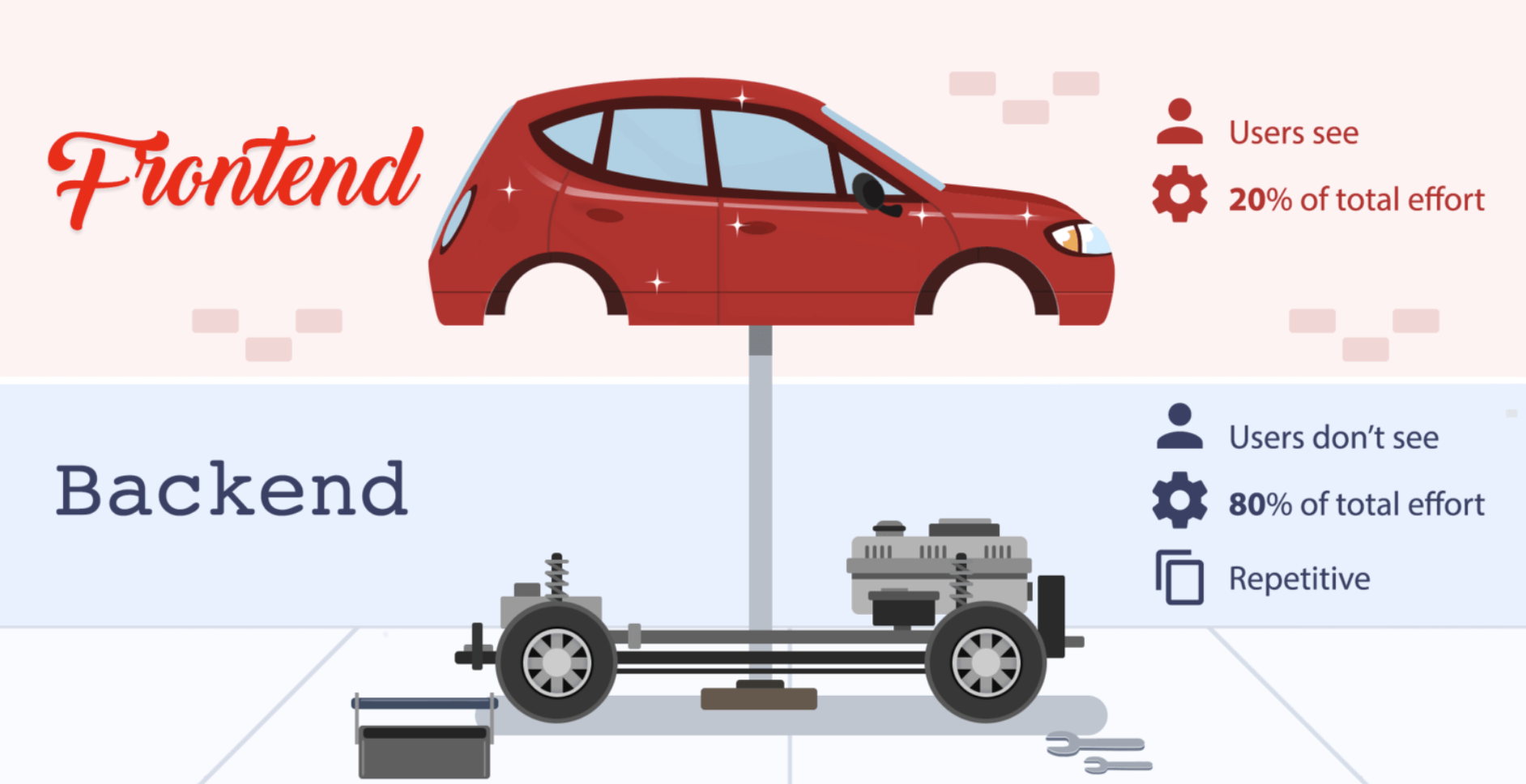
Frontend
The storefront — what your users see and click on. Buttons, pages, layout, colors.
Our Architecture
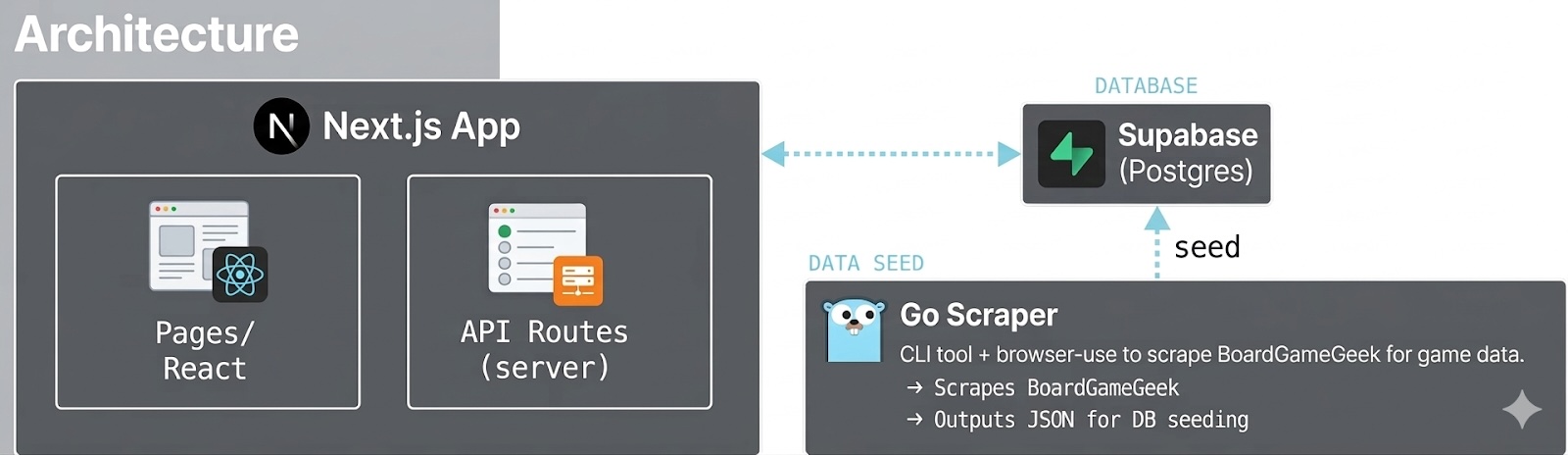
 Next.js (App Router)
Your app's engine — handles both the storefront and the back office in one place.
 Tailwind CSS
A styling toolkit — makes your app look good without writing design code from scratch.
 Supabase
Your filing cabinet in the cloud — stores all your app's data. Free tier is generous.
 Vercel
Your app's address on the internet — deploy from GitHub in one click. Free for personal projects.
 Go Scraper
A robot that collects game info from other websites so you don't have to do it by hand.
Getting Data Is the Hard Part
Where Does Data Come From?
Public APIs
Best case. Structured, documented, rate-limited. Not always available.
Web Scraping
When there's no API. Extract data from websites. This is what we're doing.
Manual Entry
Sometimes the simplest option. Works for small datasets.
Our Data: BoardGameGeek
- Game name, player count, play time
- Box art images & descriptions
- YouTube tutorial links
- Ratings & year published
13 Games Scraped
/pic9156909.png "Catan")
/pic394356.jpg "Dominion")
/pic4458123.jpg "Wingspan")
/pic3043734.jpg "King of Tokyo")
/pic3031286.jpg "Sushi Go Party!")
/pic6398727.png "SCOUT")
/pic3835714.jpg "BANG!")
+ For Sale, Startups, ito, Salt & Pepper & more
Example Output
AI-Powered Scraping
Traditional Scraping vs. Browser Use
| Aspect | Python / BeautifulSoup | Browser Use (AI Agent) |
|---|---|---|
| Setup difficulty | Write CSS selectors by hand | Describe what you want in English |
| Dynamic content | Breaks on JS-rendered pages | Uses a real browser, handles JS |
| Site changes | Selectors break constantly | AI adapts to layout changes |
| Anti-bot measures | CAPTCHAs block you | Navigates like a human |
| Speed | Fast for simple pages | Slower (10-12 min per batch) |
CLI-Driven Development
Build a Go CLI tool that orchestrates the scraper. Input JSON list of games, output structured data. Repeatable, scriptable, version-controlled.

Why Not Just Python?
Python scraping scripts are fragile and break when sites change. Browser Use sends an AI agent to browse the site like a human — it understands context, not just HTML selectors.
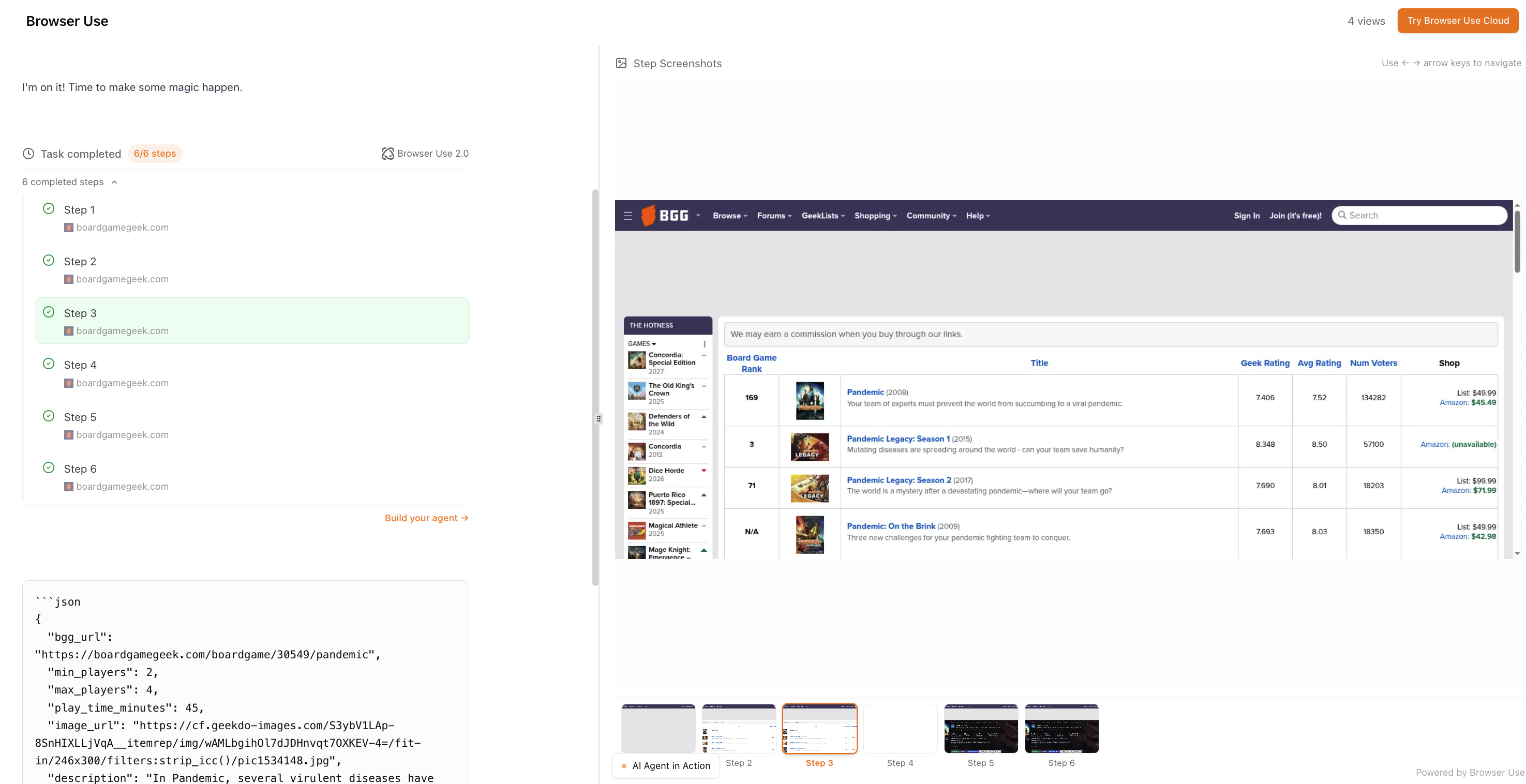
Browser Use
AI agents that interact with live websites — navigate, click, extract data
Show Live Example — Agent scraping BoardGameGeek
Why a Go CLI for Scraping?
The CLI-First Approach
- Agents call CLIs directly, verify output, and close the feedback loop
- Go’s simple types make AI-generated code more reliable with fast linting
- CLIs are repeatable, scriptable, version-controlled — no UI needed
- Text in, text out — the simplest interface for humans and AI
Why Go Specifically?
Peter found that AI agents write excellent Go code. Go compiles to a single binary, has fast linting, and its straightforward syntax means fewer AI hallucinations. TypeScript for web, Go for CLIs — pick the right tool for the job.
Peter Steinberger — Shipping at Inference-Speed
How one of the most productive AI-native engineers builds software with CLI-first tools

Building with AI Assistance
The AI-Assisted Development Flow
How It Works
- You describe what you want in plain English
- The AI writes the code for you
- It runs the code and fixes any errors automatically
- You review and approve every change before it’s saved
Tools We're Using
Claude Code — AI coding in your terminal
Cursor — AI-native code editor
The key insight: you don't need to know how to code — you need to know how to describe what you want.
Supabase & Database Setup
Setup Pipeline
What Our App Remembers
Why Supabase?
- Free cloud database — nothing to install
- Your app can read & write data automatically
- Built-in user login (if you need it later)
- Visual dashboard to see & edit your data
Supabase
Open source Firebase alternative — Postgres database, auth, real-time, storage
Optional: Adding Authentication
Supabase includes a full authentication system out of the box. While beyond the scope of this workshop, you can add user sign-up, login, and row-level security to your app with just a few lines of code.
Deploy with Vercel
From Code to Live URL in 3 Steps
Connect to Your Database
Tell Vercel where your database lives by pasting two keys from Supabase:
Auto-Deploy on Save
- Every time you save code to GitHub, your site updates automatically
- Preview links let you test changes before they go live
- One-click undo if something goes wrong
What We Built
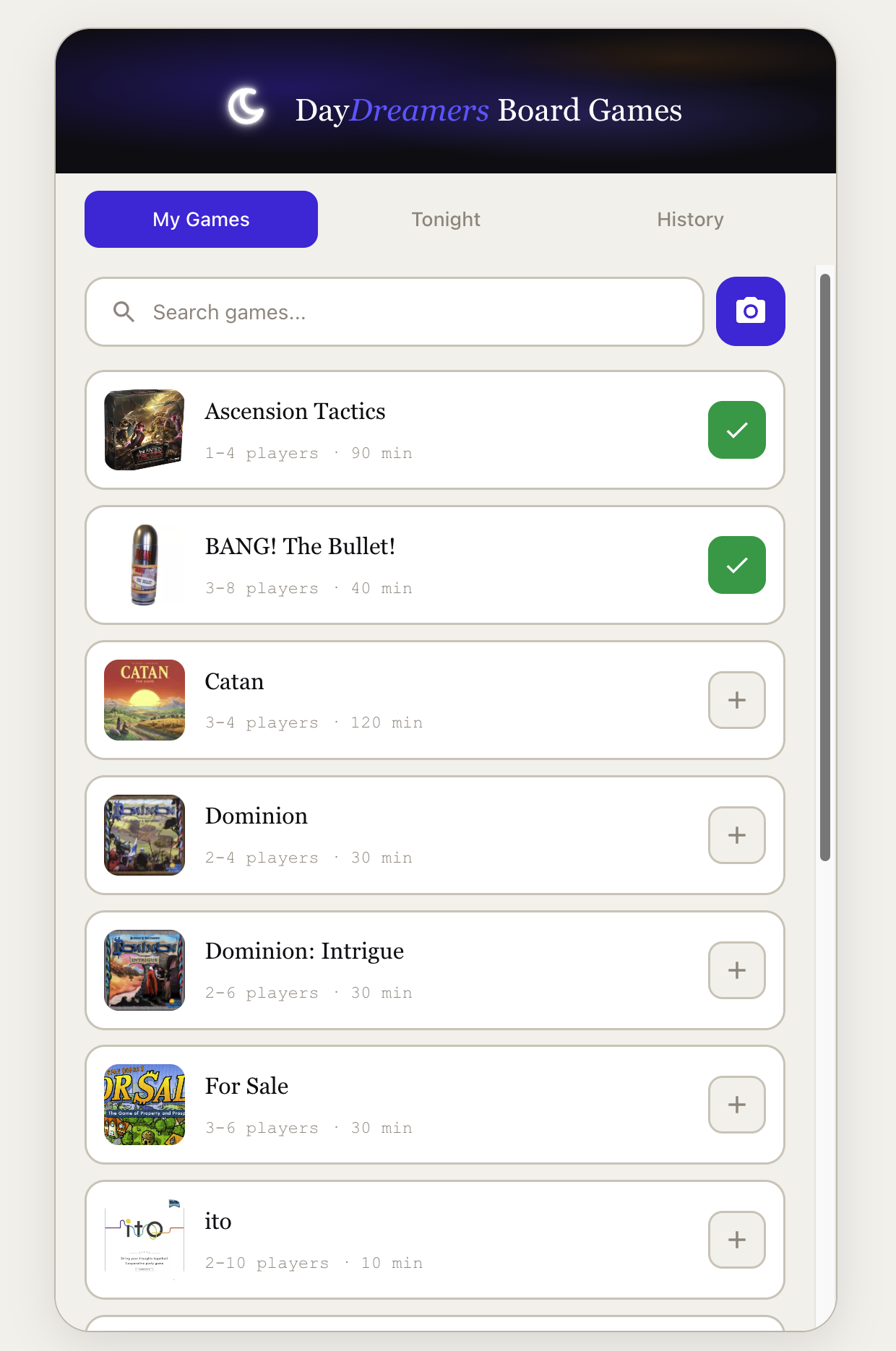
DayDreamers Board Games — Live App
Browse the collection, vote on tonight’s picks, watch tutorials
Game Collection
Browse 13 games with search, box art, and ratings
Tonight’s Picks
Vote for games, enter your name, real-time results
Game Details
Description, rating, and YouTube tutorial embeds
The Full Stack
Your Homework
Build Your Own App
- Pick a problem you care about
- Write a 1-page PRD (use AI to help!)
- Set up Supabase + Next.js project
- Use Claude Code / Cursor to build the UI
- Deploy to Vercel and share the link
Resources to Explore
- Next.js Tutorial — official learn path
- Supabase Docs — quick starts
- Tailwind CSS — utility-first styling
- Browser Use — AI web scraping
- Vercel Docs — deployment
Connect
Schedule a Consultation
Need help with your project? Book a 1-on-1 session.